
The Theme Browser is split into three functional areas:
- Top Navigation
- Left Sidebar (Local Themes)
- Right Info Panel
Top Navigation #
An Exit button appears at the top of the screen. Selecting it returns you to the main Numbuilders menu.
Left Sidebar: Local Themes #
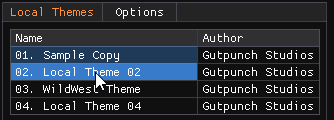
The left sidebar lists all local themes available on your system. Each entry displays:
- Theme name
- Theme author
Context Menu (Right-Click) #
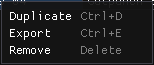
Right-clicking a theme opens a context menu with the following actions:
- Duplicate
Creates a copy of the selected theme
Shortcut:Ctrl + D - Export
Exports the theme for sharing or backup
Shortcut:Ctrl + E - Remove
Deletes the selected theme
Shortcut:Delete
These actions apply only to the currently selected theme.
Options Menu (Left Sidebar) #
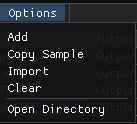
At the top of the sidebar, the Options button opens a drop-down menu with global theme actions:
- Add
Creates a new, empty theme - Copy Sample
Copies the bundled sample theme so you can explore or modify it - Import
Imports an existing theme file - Clear
Removes all current local themes - Open Directory
Loads multiple themes stored within a single directory
Right Info Panel #
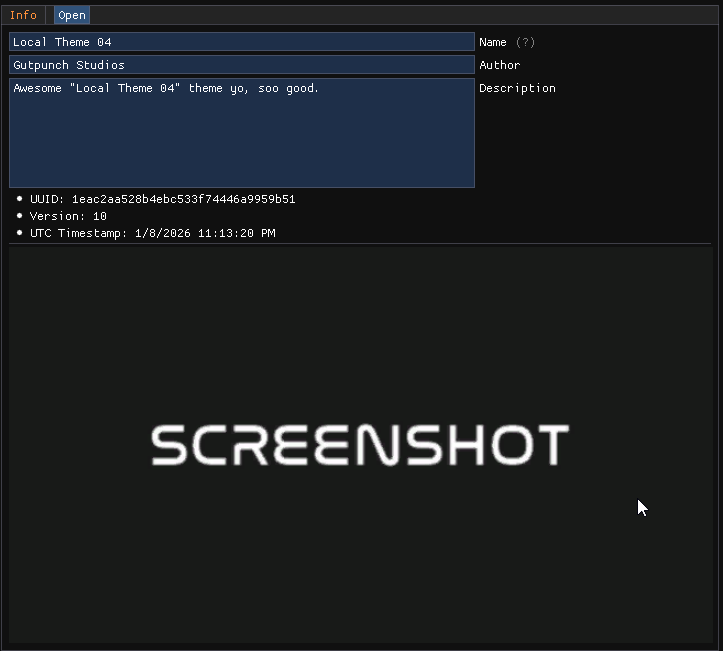
The Info Panel updates based on the selected theme and displays:
- Theme name
- Theme author
- Theme description
Tagging is planned for a future update.
There is also the theme UUID, Version and UTC of it’s creation.
Below that is an autogenerated screenshot of the theme
At the bottom of the panel, the Open button launches the selected theme in the Theme Builder for editing.
Opening an Existing Theme #
To edit a theme:
- Select the theme from the left sidebar
- Click Open in the Info Panel
The Theme Builder workspace will load for that theme.
Creating a New Theme #
To create a theme from scratch:
- Click Options
- Select Add
- Fill in the theme details in the Info Panel
- Click Open
This creates the theme and opens it in the NumBuilder for editing.


